Packing a home office can be uniquely challenging because it combines fragile, expensive technology with heavy items like books and irreplaceable, sensitive documents. Whether you are moving your home office across Vancouver, Burnaby, or Richmond, or planning a long-distance relocation, you cannot afford to have a disorganized move where cables go missing or monitors get broken.
Declutter and Secure Your Digital Data
Before you unplug a single cord, you need to prepare your physical space and your digital files. Sort through your desk drawers and filing cabinets. Securely shred outdated paperwork, toss dried-out pens, and set aside old electronics. Discarding unused items reduces moving costs and makes setting up your new workspace much easier. If you uncover old printers, broken monitors, or outdated towers, our Computer & Office E-Waste Pickup service can safely and responsibly dispose of them for you.
Crucial Step: Back Up Your Data. Hard drives can fail during a move due to jostling and temperature changes. Back up all your important work and personal files to an external hard drive, a cloud backup service, or both before powering down your machines.
Electronics and Furniture
Handling Technology and Office Furniture
Electronics and heavy furniture require careful handling to avoid crushed screens, bent cabinet frames, and lost power cords.
Cable Management and Computers
Never throw loose cables into a box. Unplug your devices, coil their cords neatly (using velcro ties, not rubber bands), place them in labeled zip-lock bags, and tape the bag to the corresponding device. You can also take reference photos of the back of your computer before unplugging anything so you know exactly how to reconnect it later.
Whenever possible, use the original packaging for your electronics, as it offers the best custom-built protection. Wrap computer monitors in bubble wrap and moving blankets, and always transport screens upright. Never stack heavy items on top of a monitor box. If you are concerned about safely transporting expensive multi-monitor setups or delicate design equipment, our team offers specialized fragile item handling to ensure your gear arrives intact. For your printer, remove all paper to avoid jams, and take out the ink or toner cartridges, packing them in a sealed plastic bag to prevent dangerous leaks.
Breaking Down Desks and Filing Cabinets
Disassemble modular desks, office chairs, and large bookshelves. Keep all screws, bolts, and hardware in labeled plastic bags and tape them securely to the main piece of furniture. When dealing with filing cabinets, never move a tall cabinet with full drawers still inside the frame. The immense weight can permanently bend the tracks. Either empty the contents into file boxes or remove the individual drawers, wrap them tightly in plastic stretch wrap, and move them separately.
Documents Books and Essentials
Securing Documents, Books, and Your "Open First" Box
Paper is incredibly heavy, and office boxes can quickly become too heavy to lift safely if they aren't packed with care. Planning this stage carefully is a vital part of any successful residential relocation.
Handling Heavy Books and Sensitive Files
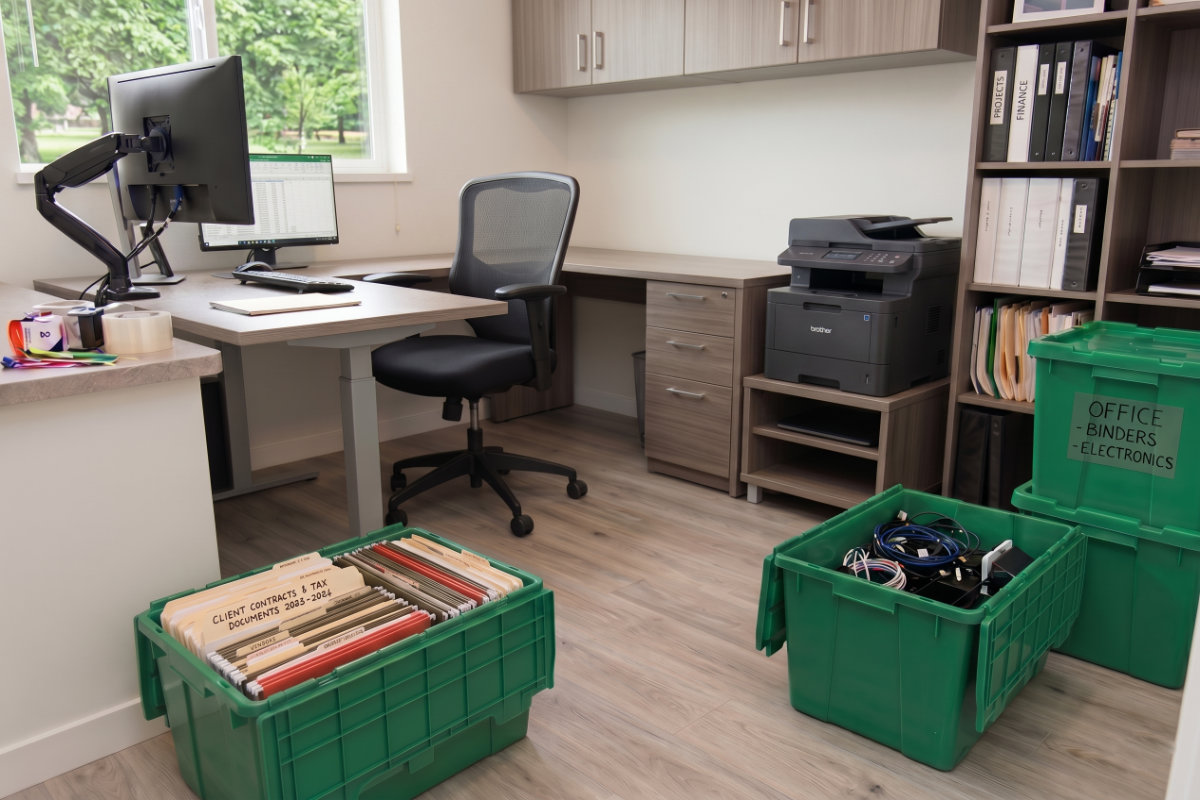
Use very small boxes for books to keep the weight manageable. Arrange books flat or upright with the spine down to prevent damaging the bindings. To keep your important paperwork safe from moisture and crushing, we highly recommend using plastic reusable moving boxes for your heavy office files. They are much stronger than standard cardboard and will not tear under the weight of heavy paper.
Note: Critical documents like tax returns, legal contracts, property deeds, and passports should never go in the back of the moving truck. Pack these in a secure folder and transport them personally.
Pack an "Essentials" Kit
To ensure you can get back online and working immediately at your new house, pack a designated "Open First" office box. This box should include your laptop, phone chargers, computer mouse, keyboard, essential power cables, current project files, and your internet router. Keep this box with you in your car so you have immediate access to it on day one.
Frequently Asked Questions
Frequently Asked Questions About Moving a Home Office
How do I safely pack dual monitors for moving?
The safest way to pack monitors is in their original boxes. If you no longer have them, wrap each screen generously in anti-static bubble wrap and protect the glass with a piece of flat cardboard. Always pack and load monitors standing upright, never laying flat, and ensure nothing heavy is stacked on top of them.
How should I handle sensitive documents and secure shredding?
Before packing, separate your paperwork. Securely shred any old, confidential documents you no longer need (like old bank statements or expired contracts) to protect your identity. For the essential legal and financial papers you are keeping, pack them in a waterproof bin or locked briefcase and carry them in your personal vehicle, not the moving truck.
What is the best way to organize and label office cables?
To avoid a messy knot of wires, use the "bag-and-tag" method: coil each cable individually, secure it with a velcro tie, and place it in a ziplock bag labeled with its corresponding device. Alternatively, you can use colored tape on both ends of a cable and put a matching piece of tape next to the port it plugs into on your computer.
What office essentials should go in my 'Open First' box?
Your 'Open First' box should contain everything you need to start working within an hour of arriving at your new home. This typically includes your laptop, mouse, keyboard, essential charging cables, internet router/modem, basic stationery (like pens and a notepad), and any active files for projects you are currently working on.
Need Help
Need Help Packing Your Home Office?
If you have delicate equipment, heavy desks, or a tight timeline, our professional movers can handle everything from packing to setup. Request a moving estimate today and move with confidence.
Wrapping Up Your Home Office Move
Packing an office strategically guarantees that your electronics stay safe, your data is protected, and your workflow isn't disrupted for long. When you arrive at your new home, set up your internet router and desk first, then take your time arranging your space for maximum productivity.
If you are looking for more expert advice on tackling the rest of your house, check out our complete room-by-room packing guide for instructions on every area of your home.

0 comments